Wednesday, August 8, 2018

Get and Set value into the input fields simultaneously.

HTML:

 <input id="field1" onkeyup="get_set_value_for_field1()" type="text" />
 <input id="field2" onkeyup="get_set_value_for_field2()" type="text" />  

SCRIPT:

 function get_set_value_for_field1() {
            document.getElementById('field2').value = document.getElementById('field1').value;
 }

 function get_set_value_for_field2() {
            document.getElementById('field1').value = document.getElementById('field2').value;
 }

Wednesday, January 10, 2018

Sending email in .NET through Gmail

C# Code Is: 

 var fromAddress = new MailAddress("unbroken4420@gmail.com", "Zihadul");
              var toAddress = new MailAddress("rajon5000@gmail.com", "Rajon");
              const string fromPassword = "*******";
              const string subject = "Subject";
              const string body = "Body";

              var smtp = new SmtpClient
              {
                  Host = "smtp.gmail.com",
                  Port = 587,
                  EnableSsl = true,
                  DeliveryMethod = SmtpDeliveryMethod.Network,
                  UseDefaultCredentials = false,
                  Credentials = new NetworkCredential(fromAddress.Address, fromPassword)
              };
              using (var message = new MailMessage(fromAddress, toAddress)
              {
                  Subject = subject,
                  Body = body
              })
              {
                  smtp.Send(message);
              }

Saturday, January 6, 2018

Base URL For Sub-domain Folder

Set on Muster Page or Layout page:

 <div id="BaseUrl" data-baseurl="@Context.Request.Url.GetLeftPart(UriPartial.Authority)@Url.Content("~/")"></div>   

JS:
var rootFolder = $("#BaseUrl").data("baseurl");
        var route =rootFolder+'/api/ApplicationMenu/Get';

Enabling session state in Web API

Create two classes; SessionControllerHandler and SessionHttpControllerRouteHandler. Implement as follows:

public class SessionControllerHandler : HttpControllerHandler, IRequiresSessionState
{
    public SessionControllerHandler(RouteData routeData)
        : base(routeData)
    { }
}
 
public class SessionHttpControllerRouteHandler : HttpControllerRouteHandler
{
    protected override IHttpHandler GetHttpHandler(RequestContext requestContext)
    {
        return new SessionControllerHandler(requestContext.RouteData);
    }
}


In your WebApiConfig, add the following above your route declaration(s):
public static class WebApiConfig { public static void Register(HttpConfiguration config) { // Web API configuration and services var httpControllerRouteHandler = typeof(HttpControllerRouteHandler).GetField("_instance", System.Reflection.BindingFlags.Static | System.Reflection.BindingFlags.NonPublic); if (httpControllerRouteHandler != null) { httpControllerRouteHandler.SetValue(null, new Lazy<HttpControllerRouteHandler>(() => new SessionHttpControllerRouteHandler(), true)); } // Web API routes config.MapHttpAttributeRoutes(); config.Routes.MapHttpRoute( name: "DefaultApi", routeTemplate: "api/{controller}/{id}", defaults: new { id = RouteParameter.Optional } ); } }


Now Session is On

HttpContext.Current.Session["ForLeftMenu"] = "Rajon";
if (HttpContext.Current.Session["ForLeftMenu"] != null)
{
  string text = HttpContext.Current.Session["ForLeftMenu"].ToString();
            } 


Tuesday, January 2, 2018

Setup dotLess CSS In ASP.NET MVC Project (Minify js/cs file)

Improve performance for dotLess files in MVC projectBundles are an easy way to merge and minify resources in your application (such as JavaScript files and CSS stylesheets). Using “System.Web.Optimization.Less” plugin, you can improve site performance in a better way.

So go back to Package Manager Console and install the below plugin:

PM> Install-Package System.Web.Optimization.Less

And add your bundle to the appropriate location within BundleConfig.cs,
  1. public class BundleConfig  
  2. {  
  3.     public static void RegisterBundles(BundleCollection bundles)  
  4.     {  
  5.         // NOTE: existing bundles are here  
  6.   
  7.         bundles.Add(new LessBundle("~/Content/less").Include("~/Content/*.less"));  
  8.     }  
  9. }  
So, this LessBundle gives you the facility to combine and minify files while running the application in <compilation debug="false" /> mode, and it takes care of transforming LESS code into CSS. It does not require updating the layout every time you add a new file to the project.

Sunday, September 10, 2017

Some SQL Queries.

CASE:

SELECT CASE WHEN a1.Id>1 THEN 'OK' ELSE 'NOT OK' END AS [ID OK/NOT] FROM (SELECT CASE WHEN Id=1 THEN 2 ELSE Id END AS Id FROM tbl_Table WHERE Id>0) a1

First Letter Concatenation:

SELECT CONVERT(nvarchar(10), Id)+' ('+LEFT(Name,1)+')' AS ID_NAME FROM tbl_Table 

PIVOT:

SELECT [2016-06-16],[2015-01-01]
FROM (
    SELECT 
        ModuleId,ModuleName,CreateDate
    FROM s_Module
) as m
PIVOT
(
    MAX(ModuleName)
    FOR [CreateDate] IN ([2016-06-16], [2015-01-01])

) AS pvt


Exe 01:
Pivot the Occupation column in OCCUPATIONS so that each Name is sorted alphabetically and displayed underneath its corresponding Occupation. The output column headers should be DoctorProfessorSinger, and Actor, respectively.
Note: Print NULL when there are no more names corresponding to an occupation.
Input Format
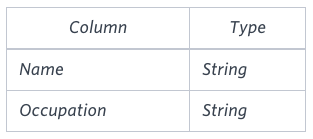
The OCCUPATIONS table is described as follows:Occupation will only contain one of the following values: DoctorProfessorSinger or Actor.
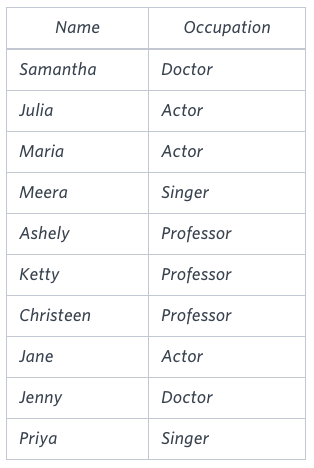
Sample Input
Sample Output
Jenny    Ashley     Meera  Jane
Samantha Christeen  Priya  Julia
NULL     Ketty      NULL   Maria

Explanation
The first column is an alphabetically ordered list of Doctor names.
The second column is an alphabetically ordered list of Professor names.
The third column is an alphabetically ordered list of Singer names.
The fourth column is an alphabetically ordered list of Actor names.
The empty cell data for columns with less than the maximum number of names per occupation (in this case, the Professor and Actor columns) are filled with NULL values.
Solution

SELECT
    [Doctor], [Professor], [Singer], [Actor]
FROM
(
    SELECT ROW_NUMBER() OVER (PARTITION BY OCCUPATION ORDER BY NAME) [RowNumber], * FROM OCCUPATIONS
) AS tempTable
PIVOT
(
    MAX(NAME) FOR OCCUPATION IN ([Doctor], [Professor], [Singer], [Actor])

) AS pivotTable


Ex-02:

Julia just finished conducting a coding contest, and she needs your help assembling the leaderboard! Write a query to print the respective hacker_id and name of hackers who achieved full scores for more than one challenge. Order your output in descending order by the total number of challenges in which the hacker earned a full score. If more than one hacker received full scores in same number of challenges, then sort them by ascending hacker_id.

Input Format
The following tables contain contest data:
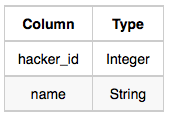
  • Hackers: The hacker_id is the id of the hacker, and name is the name of the hacker.
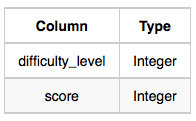
  • Difficulty: The difficult_level is the level of difficulty of the challenge, and score is the score of the challenge for the difficulty level.
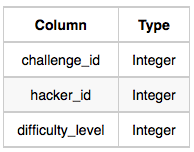
  • Challenges: The challenge_id is the id of the challenge, the hacker_id is the id of the hacker who created the challenge, and difficulty_level is the level of difficulty of the challenge.
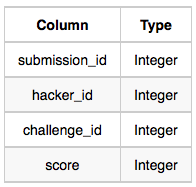
  • Submissions: The submission_id is the id of the submission, hacker_id is the id of the hacker who made the submission, challenge_id is the id of the challenge that the submission belongs to, and score is the score of the submission.
SOLUTION:

SELECT a.hacker_id, d.name  FROM Submissions AS a INNER JOIN Challenges AS b ON b.challenge_id=a.challenge_id INNER JOIN Difficulty AS c ON c.difficulty_level=b.difficulty_level  INNER JOIN Hackers AS d ON d.hacker_id=a.hacker_id  WHERE a.score=c.score   GROUP BY a.hacker_id, d.name HAVING COUNT(d.name) >1 ORDER BY COUNT(d.name) DESC, a.hacker_id ASC;